InfinitDoc

Features: team

Team access levels and activity log

One workspace for the whole team, with the right access for each person. Shared templates, contacts and invoices, and a log of who did what.

Start free See pricing

Updated

Access levels
Owner, Admin, Manager, Member, View only
Sign-in
Two-step sign-in, which an owner or admin can require
Team size
Unlimited on Business; one person on other plans

Five access levels

Invite colleagues by email and give each one a level. A Member sees only the documents they send. Managers and Admins see more, and the Owner holds the plan and billing. View only people can read but not change anything. The same rules apply on the website and in the app, and the server checks them every time.
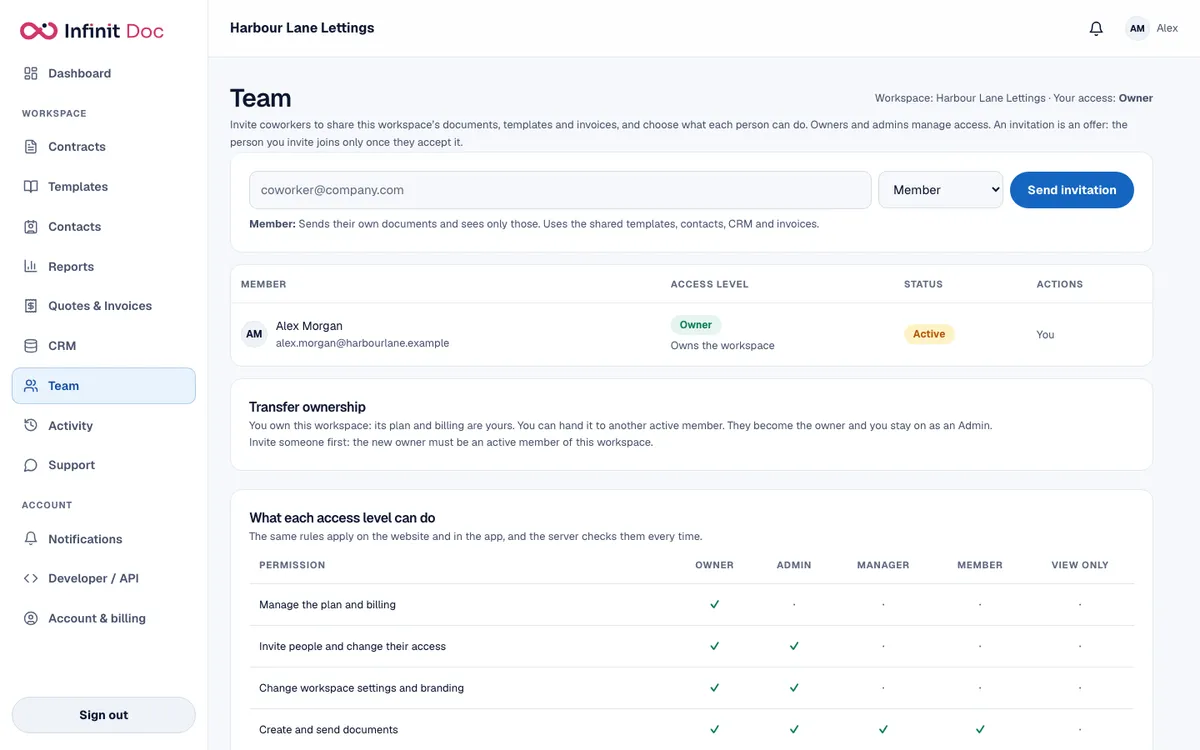
The Team screen with an invitation box, the member list and a table showing what each access level can do.
The Team screen, with the table of what each level can do.

Shared by the workspace

  • Templates, contacts, the CRM lists and quotes and invoices are shared across the workspace.
  • Ownership can be transferred to another active member.
  • An activity log shows who did what, for people with the right to see it.

Tighter sign-in rules

  • Two-step sign-in, which an owner or admin can require for everyone.
  • Session length limits.
  • An address allow-list for where people can sign in from.

Questions and answers

Which plan lets me invite my team?
The Business plan has unlimited team members. Free, Starter and Pro are for one person.
Can a member see everyone's documents?
No. A Member sees only the documents they send. Higher levels see more, and View only can read but not change.
Can I see who did what?
Yes. The activity log records what people did in the workspace, for those allowed to see it.

Set up your team workspace

Create a workspace, invite colleagues and choose what each person can do.

Start free See pricing