- For signers
- Open the link and sign, no app or account
- For senders
- The full workspace in a phone browser
- Store apps
- Being prepared, not in the stores yet
Signing on a phone
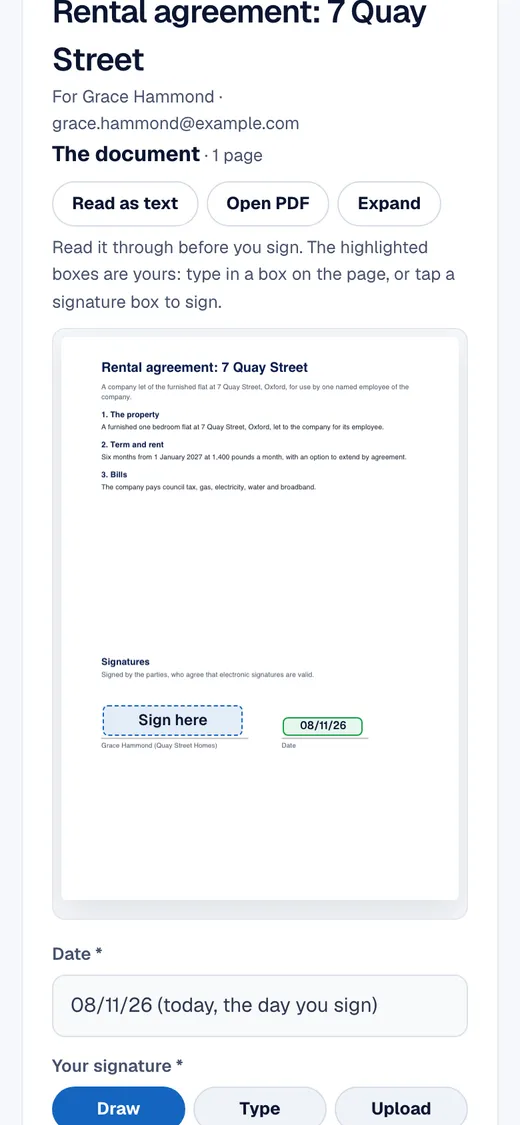
The signing page is built for a small screen: the document scrolls, the signer's boxes are highlighted, and the signature panel offers draw, type or upload. A signer who prefers the keyboard can type their name instead of drawing.
Sending from a phone
The whole workspace, including contracts, templates, contacts and invoices, works in a phone or tablet browser, so you can send a template from a site visit or check an envelope between meetings.
Tips for people signing on a phone
- Turn the phone sideways to read a wide document, or use Read as text for a plain version.
- Tap the Sign here box to start. The page counts how many required items are left.
- If drawing is awkward on a small screen, choose Type and enter your name instead.
- When everyone has signed, each signer's own link offers the signed copy and the certificate to download.
Phone apps
Native iPhone and Android apps are being prepared for the app stores. They are not available to download yet, and nothing on this site needs them.